
Skip to content
Claude

Course · Intermediate · Claude pathway, stage 2 of 5

Claude Cowork
practical workflows for business

Learn to scope multi-step tasks, give Claude the files and context it needs, correct direction at checkpoints and turn a successful task into a repeatable workflow.

Platform
Claude
Level
Intermediate
Duration
1 day
Format
Live online
Dates & price
Sent when you register interest

See what you’ll create

Watch the work take shape.

Prepared examples of the exercises in this course. Each one shows the starting material, the AI-assisted step, the human review and the finished result you can open and read.

Main example · 59 seconds · narrated, sound off until you choose

A project folder becomes three finished documents

  1. Starting material A fictional project folder
  2. Instruction Ask for the outcome, and the plan first
  3. Work in progress Claude proposes a plan
  4. Checkpoint The learner corrects an assumption
  5. Work in progress Every action gets an owner and a source
  6. Human review Checked against the files
  7. Finished work Ready to inspect below

Read the transcript
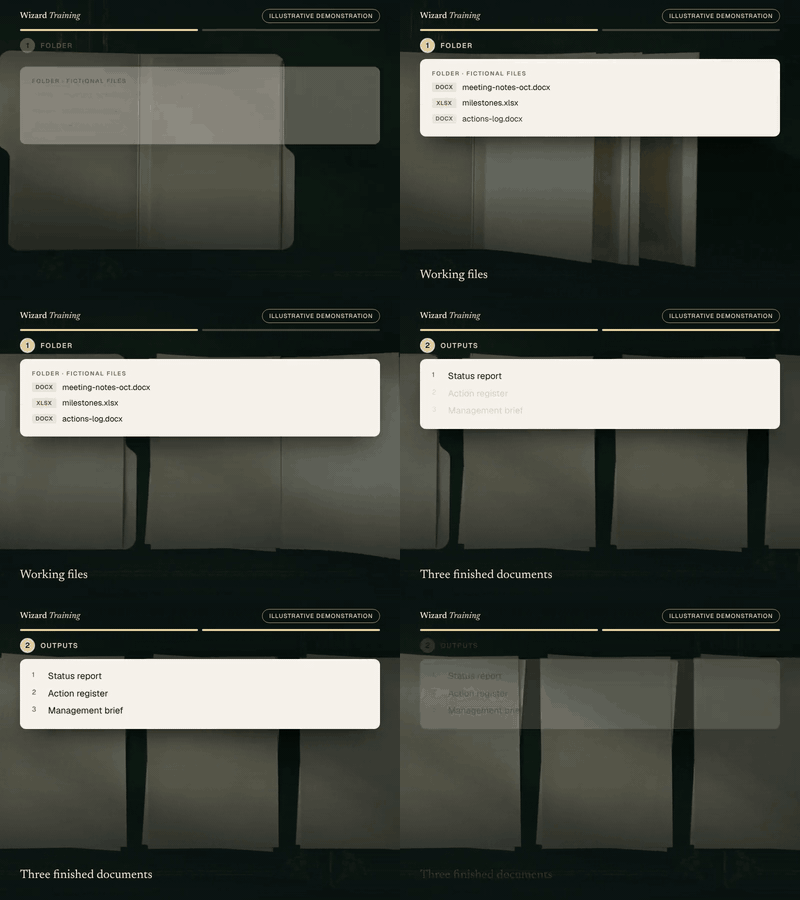
  1. Starting material. In this illustrative example, a project folder holds two sets of meeting notes, a milestones sheet, an actions log and the steering notes.
  2. Instruction. The learner asks for a status report, an action register and a management brief, and asks Claude to show its plan before it starts.
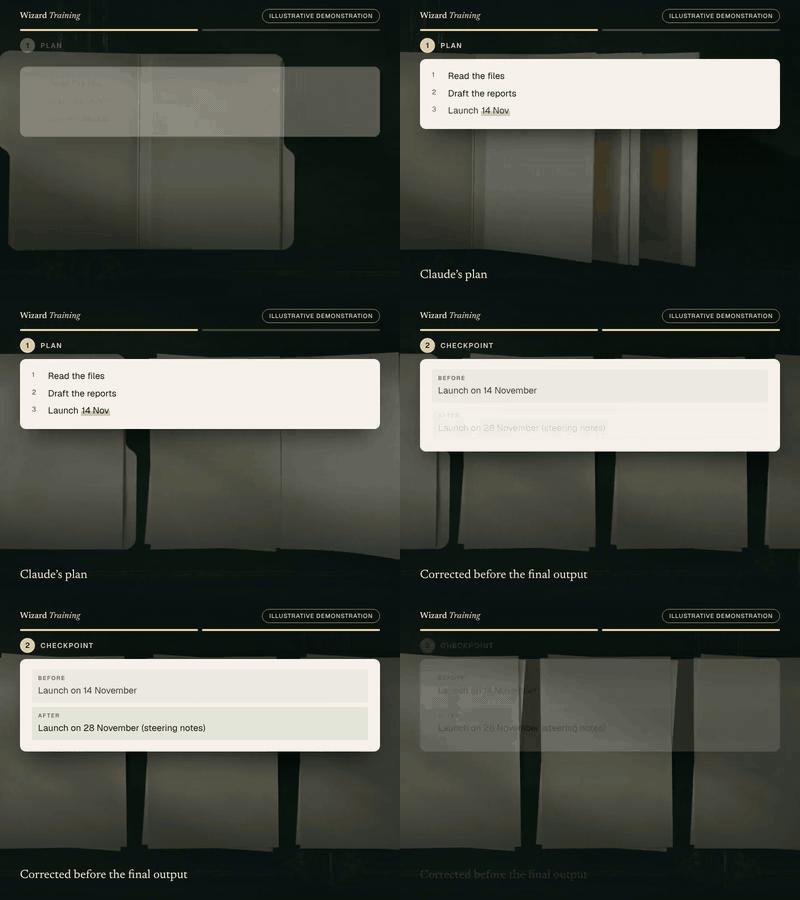
  3. Work in progress. Claude reads the folder and proposes a plan. It assumes the launch is on the fourteenth of November, from the milestones sheet.
  4. Checkpoint. At the checkpoint, the learner corrects that assumption. The steering notes moved the launch to the twenty-eighth.
  5. Work in progress. Claude builds the action register, with an owner, a due date and a source for every action.
  6. Human review. Before anything is shared, the learner checks the dates and owners against the source files.
  7. Finished work. The result is a status report, an action register and a management brief. You can read the full example below.

Prepared demonstration with fictional details. It is not a recording of Claude and not live AI output. Background footage was generated with Higgsfield and the narration uses a synthetic Higgsfield voice; the soft tones were synthesised separately. Every word, number and line of code on screen is rendered from the example below. Higgsfield is not part of the course.
Where it starts
A fictional project folder: two sets of meeting notes, a milestones sheet, an actions log and steering notes.
What you practise
Scoping a multi-step task, reviewing Claude’s plan at a checkpoint, correcting an assumption and checking the results against the files.
What the result contains
  • A status report with milestones and the corrected launch date
  • An action register: action, owner, due date and source
  • A half-page brief that leads with the decision needed
What a person still checks
  • Dates and owners against the source files
  • That the corrected date is communicated
  • Anything Claude marked as uncertain

Short loops · silent, a few seconds each

A checkpoint corrects an assumptionClaude’s plan. Then: Corrected before the final output.GIF version (1182 KB)
One folder, three documentsWorking files. Then: Three finished documents.GIF version (1226 KB)

Still images · for a quick look or a static alternative

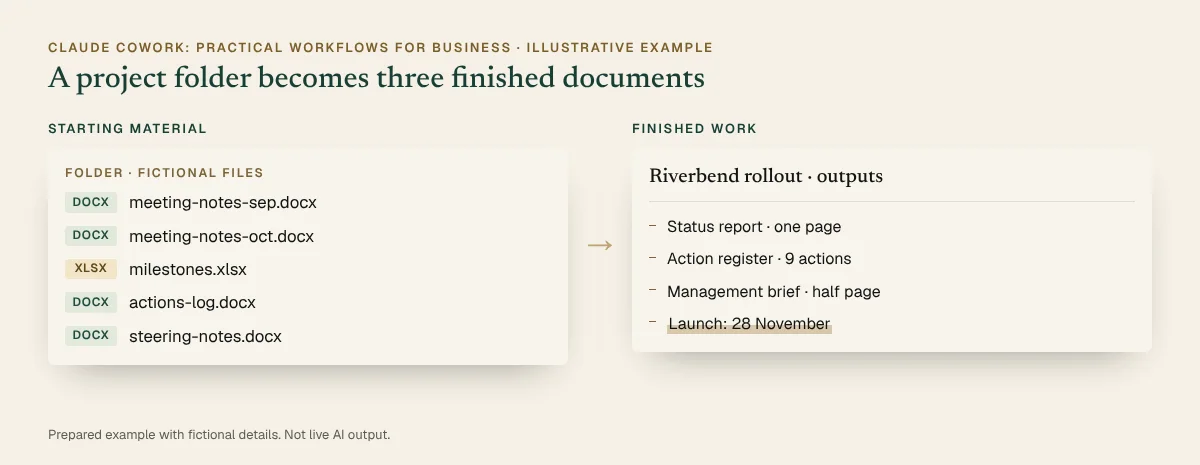
Before and after, illustrative: A fictional project folder beside the finished work. Full details are in the walkthrough below.
Before and after · static view
The completed example · select to read it in full

Inspect every step · pause, replay or show the completed state

You practise this in the course

A project folder becomes a status report, action register and management brief

  1. Starting material

    Folder · fictional files

    • meeting-notes-sep.docx
    • meeting-notes-oct.docx
    • milestones.xlsx
    • actions-log.docx
    • steering-notes.docx
  2. Prompt or instruction

    Instruction

    Using the files in the Riverbend project folder, produce a one-page status report, an action register (action, owner, due date, source) and a half-page management brief. Show me your plan before you start, and flag any dates you are unsure about.

  3. AI-assisted work

    1. Read the five files
    2. Draft the status report
    3. Build the action register
    4. Write the management brief
    5. Plan says launch 14 Nov (milestones.xlsx)
  4. Human review

    • Plan reviewed before work started (Checked)
    • Launch moved to 28 Nov in steering notes: corrected (Action needed)
    • Every action has an owner and a source (Checked)
    • Nothing added beyond the folder (Checked)
  5. Finished deliverable

    Riverbend rollout · outputs

    • Status report · one page
    • Action register · 9 actions
    • Management brief · half page
    • Launch: 28 November
You start with
A fictional project folder: two sets of meeting notes, a milestones sheet, an actions log and steering notes.
What you practise
Scoping a multi-step task, reviewing Claude’s plan at a checkpoint, correcting an assumption and checking the results against the files.
The finished output contains
  • A status report with milestones and the corrected launch date
  • An action register: action, owner, due date and source
  • A half-page brief that leads with the decision needed
Still needs human checking
  • Dates and owners against the source files
  • That the corrected date is communicated
  • Anything Claude marked as uncertain
Related course
Claude Cowork: Practical Workflows for Business · Module: Working with files and deliverables · Checkpoints, permissions and review

Account note: Cowork needs a paid Claude plan; local folders need the Claude desktop app. On some accounts Cowork appears inside chat, on others as a separate option, and Enterprise organisations enable it centrally.

Download the sample (PDF, 24 KB)

Prepared demonstration Prepared demonstrations with fictional names and figures. They show the kind of work practised, not live AI output, and your own results will depend on your material.

Who it's for

Business users, administrators, managers and operations teams who already use Claude and want it to handle larger, multi-step tasks across files.

Experience needed: Comfortable using Claude for everyday tasks, for example after Claude Foundations for Work. No technical skills needed.

Problems it solves

If this sounds familiar

  • Multi-step tasks you still do by hand, one chat at a time
  • Folders of notes and files that need turning into reports
  • Not knowing what Claude can access, change or send
  • Workflows that work once but are hard to repeat

Outcomes

By the end you can

  • Scope multi-step tasks with clear outcomes and checkpoints
  • Give Claude the right files and context, and nothing more
  • Produce formatted deliverables from a folder of working files
  • Correct direction at checkpoints instead of starting again
  • Understand what Claude can access and when it asks before acting
  • Turn a successful task into a repeatable workflow

Modules

How the day runs

4 modules, taught live with hands-on practice in each. Select a module to see its topics.

  1. Scoping work for Claude
  2. Working with files and deliverables
  3. Checkpoints, permissions and review
  4. Repeatable workflows

1Scoping work for Claude

4 topics
  • Describing the outcome, not just the steps
  • Giving useful context: files, audience and standards
  • Breaking a large task into checkpoints
  • Deciding what Claude should and shouldn’t touch

2Working with files and deliverables

4 topics
  • Connecting a folder and choosing what to share
  • Producing documents, spreadsheets and briefs
  • Keeping source files and outputs separate
  • Names, versions and where results are saved

3Checkpoints, permissions and review

4 topics
  • Reading Claude’s plan before it starts
  • Correcting an assumption mid-task
  • Approval settings: what Claude asks before doing
  • Reviewing results against the source files

4Repeatable workflows

4 topics
  • Turning a one-off task into a reusable instruction
  • Templates and checklists that keep results consistent
  • When a scheduled or recurring task makes sense
  • Handing a workflow to a colleague

Practical exercises

What you practise

  1. Exercise 1

    Scope a multi-step task

    Rewrite a vague request as an outcome, inputs, constraints and checkpoints.

  2. Exercise 2

    Folder to status report

    Turn a fictional project folder into a status report, an action register and a management brief.

  3. Exercise 3

    Checkpoint correction

    Spot and correct a wrong assumption in Claude’s plan before the final output is produced.

  4. Exercise 4

    Make it repeatable

    Save the method as a reusable instruction with a template and a review checklist.

What you will create

Real work, finished during the session

Sample previews · illustrative content, not final course material · Watch examples take shape

ReportProject status report
Sources
Meeting notes, milestones, actions log
Sections
Progress, milestones, risks, decisions
Check
Dates confirmed against the steering notes

Progress, milestones and risks drawn from the project folder and checked against the sources.

RegisterAction register
Columns
Action, owner, due, source, status
Rule
No owner, no action
Check
Duplicates merged

Every open action with an owner, a due date and its source.

BriefManagement brief
Length
One page
Leads with
Decisions needed
Check
Nothing beyond the sources

One page for leadership: status, decisions needed and risks.

You leave with

  • A status report, action register and management brief from the practice project
  • A task-scoping template
  • A review checklist for multi-step work
  • A reusable workflow instruction

Platform and delivery

Where you learn

Claude

Taught on Claude. One day, live online. Register interest for the next dates and the price. This course is stage 2 of the Claude learning pathway. About Claude training

Requirements

Before you come

Account

A paid Claude plan (Pro, Max, Team or Enterprise) and the Claude desktop app for work with local folders. Anthropic is bringing Cowork into the main Claude experience, so some accounts show it in chat and others as a separate Cowork option; availability also differs between desktop, web and mobile, and Enterprise organisations enable it centrally. We confirm the right set-up for your account when you register interest.

Equipment

A computer that can run the Claude desktop app, a stable internet connection, and a small folder of non-confidential sample files. We can provide fictional practice files.

Experience

Comfortable using Claude for everyday tasks, for example after Claude Foundations for Work. No technical skills needed.

Data

Use only non-confidential material in exercises. We show you how to check your organisation's AI policy and what not to paste into an assistant.

Dates and pricing

How to book

Public sessions

Register interest and we'll email you the next available dates, session times and the price. Nothing is booked until you confirm.

Register interest

Private team sessions

Teams of six or more can book a private session, with exercises adapted to your own work and tools.

About team training

Questions

Before you register

Is Cowork still a separate mode?

It depends on your account. Anthropic is bringing Cowork into the main Claude experience, so some accounts see it in chat and others as a separate Cowork option. The course teaches the working method, which is the same either way.

Which plan do I need?

A paid Claude plan: Pro, Max, Team or Enterprise. Working with local folders needs the Claude desktop app. On Enterprise plans an administrator enables it.

Will Claude change or delete my files?

Claude works only in the folders you connect, and approval settings decide what it asks before doing. In the course you use a fictional project folder and practise reviewing every change before accepting it.

Do I need technical skills?

No. You need to be comfortable using Claude for everyday work. Claude Foundations for Work is a good first step.

How long is the course?

One day, live online. Register interest and we’ll email you the next available dates and the price.

Claude CoworkRegister interest

Finished example · prepared demonstration

A project folder becomes a status report, action register and management brief

You practise this in the course

Project
Riverbend client portal rollout (fictional)
Period
September to October
Sources
Five files in the project folder

Status report

On track, with one date change: launch moves from 14 to 28 November, as agreed at the steering meeting on 3 October.

MilestoneDateStatus
Pilot complete26 SepDone
Training materials17 OctIn progress
Launch28 Nov (was 14 Nov)On track

Action register (extract)

ActionOwnerDueSource
Confirm launch communicationsPriya31 OctSteering notes
Book training sessionsTom24 OctOctober meeting
Update the risk logSam20 OctActions log

Management brief

Decision needed: approve the revised launch date of 28 November. Main risk: training sessions must be booked by 24 October to keep the new date.

Fictional names and figures. Prepared to show the kind of output, not live AI output.

Finished example · prepared demonstration

A messy shared folder becomes an organised structure, with approval before any change

You practise this in the course

Structure

  1. 01 Admin
  2. 02 Clients (one folder per client)
  3. 03 Archive (older than two years)

Naming rule

Year-month, client, document: for example 2026-09 Riverbend proposal.

Change log (extract)

BeforeAfterStatus
final_v2.docx2026-09 Riverbend proposal.docxRenamed after approval
FINAL invoice.pdf2026-08 Harbour invoice.pdfRenamed after approval
proposal (1).docx–Held: possible duplicate

Fictional names and figures. Prepared to show the kind of output, not live AI output.