

Claude MCP: Connect and Configure
Configure, test and govern MCP connections to Claude, starting with read-only access.
View course Claude MCP: Connect and ConfigureRegister interest in Claude MCP: Connect and Configure
Course · Advanced · Claude pathway, stage 5 of 5
Design a narrowly scoped MCP server, define tools with structured inputs, connect a sample data source, and build in validation, error handling and protection against unintended actions.

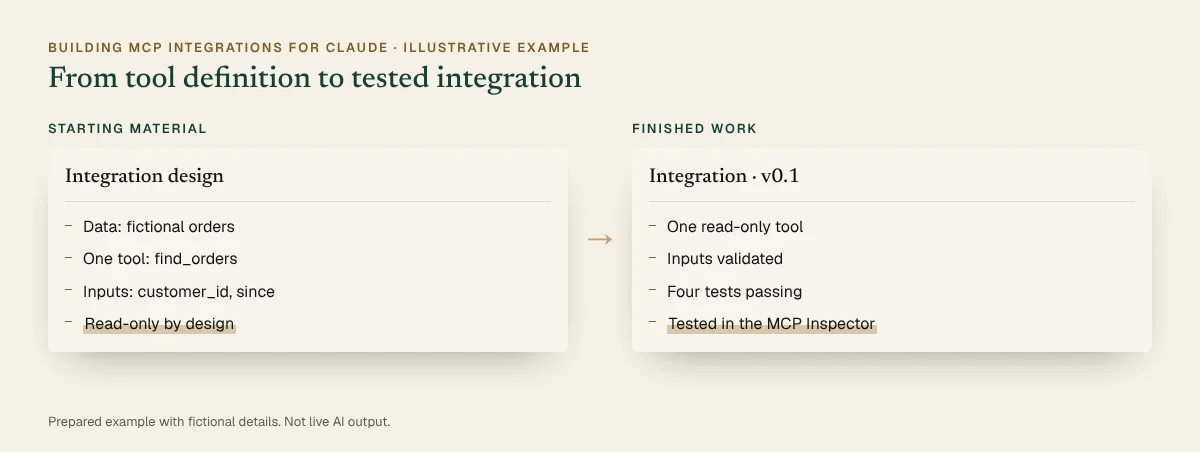
See what you’ll create
Prepared examples of the exercises in this course. Each one shows the starting material, the AI-assisted step, the human review and the finished result you can open and read.
Main example · 53 seconds · narrated, sound off until you choose
Prepared demonstration with fictional details. It is not a recording of Claude and not live AI output. Background footage was generated with Higgsfield and the narration uses a synthetic Higgsfield voice; the soft tones were synthesised separately. Every word, number and line of code on screen is rendered from the example below. Higgsfield is not part of the course.
You practise this in the course
1Tool definition
server.py (excerpt)
from mcp.server import MCPServer
mcp = MCPServer("demo-orders")
@mcp.tool()
def find_orders(customer_id: str, since: str) -> list[dict]:
"""Find a customer's orders since a date (YYYY-MM-DD)."""
check_inputs(customer_id, since) # rejects bad input
return query_sample_orders(customer_id, since)
if __name__ == "__main__":
mcp.run(transport="stdio")2Instruction
Instruction
Help me add input validation to find_orders: customer_id must look like C-1234 and since must be a valid YYYY-MM-DD date. Return a clear error for bad input without exposing internal details, and suggest tests for valid, invalid and unknown-customer requests.
3Sample request
tools/call request
{
"name": "find_orders",
"arguments": {
"customer_id": "C-1042",
"since": "2026-09-01"
}
}4Testing and review
5Finished integration
Integration · v0.1
Account note: Python 3.10 or later with uv and the official MCP Python SDK; a TypeScript version is also available. Code shown is an excerpt; helper functions are written in the course.
Prepared demonstration Prepared demonstrations with fictional names and figures. They show the kind of work practised, not live AI output, and your own results will depend on your material.
Who it's for
Experience needed: Working knowledge of Python or TypeScript, the command line, git, JSON and HTTP APIs. Familiarity with JSON Schema and OAuth concepts helps.
Problems it solves
Outcomes
Modules
4 modules, taught live with hands-on practice in each. Select a module to see its topics.
Practical exercises
Define the scope, tools and inputs for a small integration over fictional data.
Implement a tool with validated inputs that queries the sample data source.
Send invalid input, missing data and an unauthorised request, and handle each safely.
Test in the MCP Inspector and in Claude, then document the tools, limits and set-up.
What you will create
Sample previews · illustrative content, not final course material · Watch examples take shape
A small server with one validated tool over a fictional dataset.
Valid, invalid and unauthorised requests, each with the expected result.
What must be true before the integration is used by anyone else.
Platform and delivery
Taught on Claude. One day, live online. Register interest for the next dates and the price. This course is stage 5 of the Claude learning pathway. About Claude training →
Requirements
A computer with Python 3.10 or later (with uv) or Node.js 20 or later, plus git and a code editor. A Claude plan for testing in Claude; the MCP Inspector lets you test without one. We use the official MCP SDKs and the documentation current at the time of the course.
A computer where you can install Python 3.10 or later with uv (or Node.js 20 or later), a code editor and the Claude desktop app. Check with your IT team first if your computer is managed.
Working knowledge of Python or TypeScript, the command line, git, JSON and HTTP APIs. Familiarity with JSON Schema and OAuth concepts helps.
Use only non-confidential material in exercises. We show you how to check your organisation's AI policy and what not to paste into an assistant.
Dates and pricing
Register interest and we'll email you the next available dates, session times and the price. Nothing is booked until you confirm.
Teams of six or more can book a private session, with exercises adapted to your own work and tools.
Questions
Python or TypeScript, using the official MCP SDKs. Tell us which you prefer when you register interest.
No, but Claude MCP: Connect and Configure is a useful first step if you have not configured a server before.
No. You build and test locally against fictional data, and we cover what changes for a remote deployment.
We teach against the current MCP specification and SDK documentation at the time of the course. The SDKs change regularly, so we check before each session.
One day, live online. Register interest and we’ll email you the next available dates and the price.

Configure, test and govern MCP connections to Claude, starting with read-only access.
Level AdvancedDuration 1 dayFormat Live online
View course Claude MCP: Connect and Configure →Register interest in Claude MCP: Connect and Configure

Package a repeatable method as a skill or reusable workflow that produces consistent results.
Level AdvancedDuration 1 dayFormat Live online
View course Claude Skills and Reusable Workflows →Register interest in Claude Skills and Reusable Workflows

We'd like to use Google Analytics cookies to see which pages and courses are useful. Nothing is set unless you accept. Privacy policy