

Skip to content
Claude

Course · Advanced · Claude pathway, stage 5 of 5

Building MCP integrations
for Claude

Design a narrowly scoped MCP server, define tools with structured inputs, connect a sample data source, and build in validation, error handling and protection against unintended actions.

Platform
Claude
Level
Advanced
Duration
1 day
Format
Live online
Dates & price
Sent when you register interest

See what you’ll create

Watch the work take shape.

Prepared examples of the exercises in this course. Each one shows the starting material, the AI-assisted step, the human review and the finished result you can open and read.

Main example · 53 seconds · narrated, sound off until you choose

From tool definition to tested integration

  1. Starting material A narrow, read-only design
  2. Tool definition Typed inputs, validated
  3. Sample request A sample request
  4. Validation Bad input is refused safely
  5. Structured response A structured result
  6. Testing Valid, invalid, unknown
  7. Finished work A tested, read-only integration

Read the transcript
  1. Starting material. This example starts with a narrow design: one read-only tool over fictional order data.
  2. Tool definition. The tool is defined with the official Python SDK, with typed inputs that are validated before any query runs.
  3. Sample request. Here is a sample request: one customer, orders since the first of September.
  4. Validation. An invalid date is refused with a clear message, and no internal detail is exposed.
  5. Structured response. A valid request returns a structured result from the sample data.
  6. Testing. Tests cover valid, invalid and unknown requests. One log line contained a customer name, so it was removed.
  7. Finished work. The result is a small, tested, read-only integration, ready for review.

Prepared demonstration with fictional details. It is not a recording of Claude and not live AI output. Background footage was generated with Higgsfield and the narration uses a synthetic Higgsfield voice; the soft tones were synthesised separately. Every word, number and line of code on screen is rendered from the example below. Higgsfield is not part of the course.
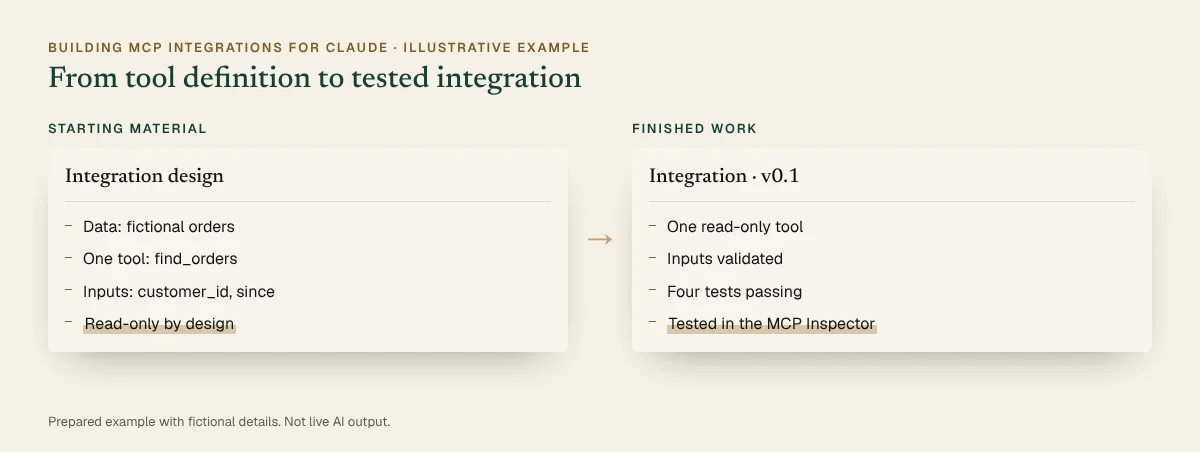
Where it starts
An integration design: one read-only tool over fictional order data.
What you practise
Defining a tool with typed inputs, validating them, returning structured results and testing valid, invalid and unknown requests.
What the result contains
  • A tool with typed, validated inputs
  • Structured results and clear errors
  • A test log for valid, invalid and unknown requests
What a person still checks
  • That error messages leak no internal detail
  • That logs contain no personal data
  • That there are no write paths

Short loops · silent, a few seconds each

Request, validation, structured responseA sample request. Then: A structured result.GIF version (896 KB)
Invalid input is refused safelyAn invalid date. Then: Refused safely.GIF version (891 KB)

Still images · for a quick look or a static alternative

Before and after, illustrative: A narrow, read-only design beside the finished work. Full details are in the walkthrough below.
Before and after · static view
The completed example · select to read it in full

Inspect every step · pause, replay or show the completed state

You practise this in the course

A tool definition becomes a tested, read-only integration

  1. Tool definition

    server.py (excerpt)

    from mcp.server import MCPServer
    
    mcp = MCPServer("demo-orders")
    
    @mcp.tool()
    def find_orders(customer_id: str, since: str) -> list[dict]:
        """Find a customer's orders since a date (YYYY-MM-DD)."""
        check_inputs(customer_id, since)   # rejects bad input
        return query_sample_orders(customer_id, since)
    
    if __name__ == "__main__":
        mcp.run(transport="stdio")
  2. Instruction

    Instruction

    Help me add input validation to find_orders: customer_id must look like C-1234 and since must be a valid YYYY-MM-DD date. Return a clear error for bad input without exposing internal details, and suggest tests for valid, invalid and unknown-customer requests.

  3. Sample request

    tools/call request

    {
      "name": "find_orders",
      "arguments": {
        "customer_id": "C-1042",
        "since": "2026-09-01"
      }
    }
  4. Testing and review

    • Valid request: structured result (Checked)
    • Bad date: clear error, no stack trace (Checked)
    • Unknown customer: empty list (Checked)
    • Log line held a customer name: removed (Action needed)
  5. Finished integration

    Integration · v0.1

    • One read-only tool
    • Inputs validated
    • Four tests passing
    • Tested in the MCP Inspector
You start with
An integration design: one read-only tool over fictional order data.
What you practise
Defining a tool with typed inputs, validating them, returning structured results and testing valid, invalid and unknown requests.
The finished output contains
  • A tool with typed, validated inputs
  • Structured results and clear errors
  • A test log for valid, invalid and unknown requests
Still needs human checking
  • That error messages leak no internal detail
  • That logs contain no personal data
  • That there are no write paths
Related course
Building MCP Integrations for Claude · Module: Building with the official SDK · Security and reliability · Testing and deployment

Account note: Python 3.10 or later with uv and the official MCP Python SDK; a TypeScript version is also available. Code shown is an excerpt; helper functions are written in the course.

Download the sample (PDF, 28 KB)

Prepared demonstration Prepared demonstrations with fictional names and figures. They show the kind of work practised, not live AI output, and your own results will depend on your material.

Who it's for

Developers and integration engineers who want to connect Claude to their organisation’s data and services.

Experience needed: Working knowledge of Python or TypeScript, the command line, git, JSON and HTTP APIs. Familiarity with JSON Schema and OAuth concepts helps.

Problems it solves

If this sounds familiar

  • Integrations that expose far more than a task needs
  • Tools Claude calls with the wrong inputs
  • Errors that fail silently or leak details
  • Credentials stored where they shouldn’t be

Outcomes

By the end you can

  • Design a narrowly scoped integration
  • Define tools with structured, validated inputs
  • Connect a sample data source and return structured results
  • Handle authentication, validation and errors safely
  • Test, log and plan deployment
  • Protect credentials and prevent unintended actions

Modules

How the day runs

4 modules, taught live with hands-on practice in each. Select a module to see its topics.

  1. Designing the integration
  2. Building with the official SDK
  3. Security and reliability
  4. Testing and deployment

1Designing the integration

4 topics
  • Choosing a narrow, valuable scope
  • Tools, resources and prompts: which to use
  • Read-only first: separating reads from actions
  • Naming and describing tools so Claude uses them well

2Building with the official SDK

4 topics
  • Project set-up with the Python or TypeScript SDK
  • Defining tools with typed, validated inputs
  • Connecting a sample data source
  • Returning structured results

3Security and reliability

4 topics
  • Authentication and authorisation
  • Validating input and handling errors safely
  • Protecting credentials and secrets
  • Preventing unintended actions: confirmation and limits

4Testing and deployment

4 topics
  • Testing with the MCP Inspector and in Claude
  • Logging without leaking data
  • Local (stdio) versus remote (Streamable HTTP) deployment
  • Versions, monitoring and keeping up with specification changes

Practical exercises

What you practise

  1. Exercise 1

    Design brief

    Define the scope, tools and inputs for a small integration over fictional data.

  2. Exercise 2

    Build the read-only tool

    Implement a tool with validated inputs that queries the sample data source.

  3. Exercise 3

    Break it on purpose

    Send invalid input, missing data and an unauthorised request, and handle each safely.

  4. Exercise 4

    Test and document

    Test in the MCP Inspector and in Claude, then document the tools, limits and set-up.

What you will create

Real work, finished during the session

Sample previews · illustrative content, not final course material · Watch examples take shape

ServerRead-only MCP server
Tool
find_orders
Inputs
Typed and validated
Writes
None

A small server with one validated tool over a fictional dataset.

TestsTest set
Valid
Structured result
Invalid
Clear error, no detail leak
Denied
Refused safely

Valid, invalid and unauthorised requests, each with the expected result.

ChecklistRelease checklist
Secrets
Outside the code
Scope
Least privilege
Logs
No personal data

What must be true before the integration is used by anyone else.

You leave with

  • A working MCP server over fictional data
  • Tests for valid, invalid and unauthorised requests
  • An integration design template
  • A security and release checklist

Platform and delivery

Where you learn

Claude

Taught on Claude. One day, live online. Register interest for the next dates and the price. This course is stage 5 of the Claude learning pathway. About Claude training

Requirements

Before you come

Account

A computer with Python 3.10 or later (with uv) or Node.js 20 or later, plus git and a code editor. A Claude plan for testing in Claude; the MCP Inspector lets you test without one. We use the official MCP SDKs and the documentation current at the time of the course.

Equipment

A computer where you can install Python 3.10 or later with uv (or Node.js 20 or later), a code editor and the Claude desktop app. Check with your IT team first if your computer is managed.

Experience

Working knowledge of Python or TypeScript, the command line, git, JSON and HTTP APIs. Familiarity with JSON Schema and OAuth concepts helps.

Data

Use only non-confidential material in exercises. We show you how to check your organisation's AI policy and what not to paste into an assistant.

Dates and pricing

How to book

Public sessions

Register interest and we'll email you the next available dates, session times and the price. Nothing is booked until you confirm.

Register interest

Private team sessions

Teams of six or more can book a private session, with exercises adapted to your own work and tools.

About team training

Questions

Before you register

Which languages are covered?

Python or TypeScript, using the official MCP SDKs. Tell us which you prefer when you register interest.

Do I need to know MCP already?

No, but Claude MCP: Connect and Configure is a useful first step if you have not configured a server before.

Will we deploy to production?

No. You build and test locally against fictional data, and we cover what changes for a remote deployment.

Is the code current?

We teach against the current MCP specification and SDK documentation at the time of the course. The SDKs change regularly, so we check before each session.

How long is the course?

One day, live online. Register interest and we’ll email you the next available dates and the price.

Building MCP IntegrationsRegister interest

Finished example · prepared demonstration

A tool definition becomes a tested, read-only integration

You practise this in the course

server.py (excerpt)
from mcp.server import MCPServer

mcp = MCPServer("demo-orders")

@mcp.tool()
def find_orders(customer_id: str, since: str) -> list[dict]:
    """Find a customer's orders since a date (YYYY-MM-DD)."""
    check_inputs(customer_id, since)   # rejects bad input
    return query_sample_orders(customer_id, since)

if __name__ == "__main__":
    mcp.run(transport="stdio")

Tests

RequestExpectedResult
C-1042 since 2026-09-01Three orders, structuredPassed
since “last month”Error: date must be YYYY-MM-DDPassed
C-9999 (unknown)Empty listPassed
Log outputNo personal dataPassed after fix

Security notes

  • Read-only: no write or delete tools
  • API key read from the environment, not the code
  • Errors describe the input problem only

Fictional names and figures. Prepared to show the kind of output, not live AI output.